
How to Build a Terraform Provider from Scratch
If you’ve ever hit the edge of what Terraform can manage, the problem usually looks the same. Your team has an internal API, a third-party service without a provider, or a set of platform abstractions that only exist behind scripts.
At that point, most teams fall back to Bash, Python, or CI jobs that call the API directly. That works for a while, but you lose terraform plan, drift detection, import support, and the shared workflow your team already uses for the rest of its infrastructure.
A provider is how you close that gap. This guide walks through how providers work, when it makes sense to build one, and what the implementation looks like with the Terraform Plugin Framework.
What Terraform really does
At its core, Terraform is a state reconciliation engine. You describe a desired state in HCL, Terraform compares that configuration with the current state, computes a plan, and applies the changes needed to converge.
resource "aws_s3_bucket" "assets" {
  bucket = "my-company-assets"
}
Terraform does not know how to create an S3 bucket by itself. That knowledge lives in the provider. The provider is the plugin that teaches Terraform how to talk to AWS, Kubernetes, GitHub, or any other system with an API.
Providers expose three building blocks:
- Resources: objects Terraform can create, read, update, and delete.
- Data sources: read-only lookups for existing data.
- Functions: custom functions callable from HCL in Terraform 1.8 and later.
When you run terraform init, Terraform downloads the provider binary from the Terraform Registry or a private mirror. From that point on, plan and apply call into that binary whenever Terraform needs to interact with the target system.
How Terraform Core talks to providers
Terraform starts the provider as a subprocess and speaks to it over the Terraform Plugin Protocol, which uses gRPC and Protocol Buffers under the hood.
- Terraform Core starts the provider binary.
- Terraform and the provider establish a local gRPC connection.
- Core calls methods such as
PlanResourceChange,ApplyResourceChange, andReadResource. - The provider translates those requests into API calls.
- The provider returns the resulting state, and Terraform writes it to
terraform.tfstate.
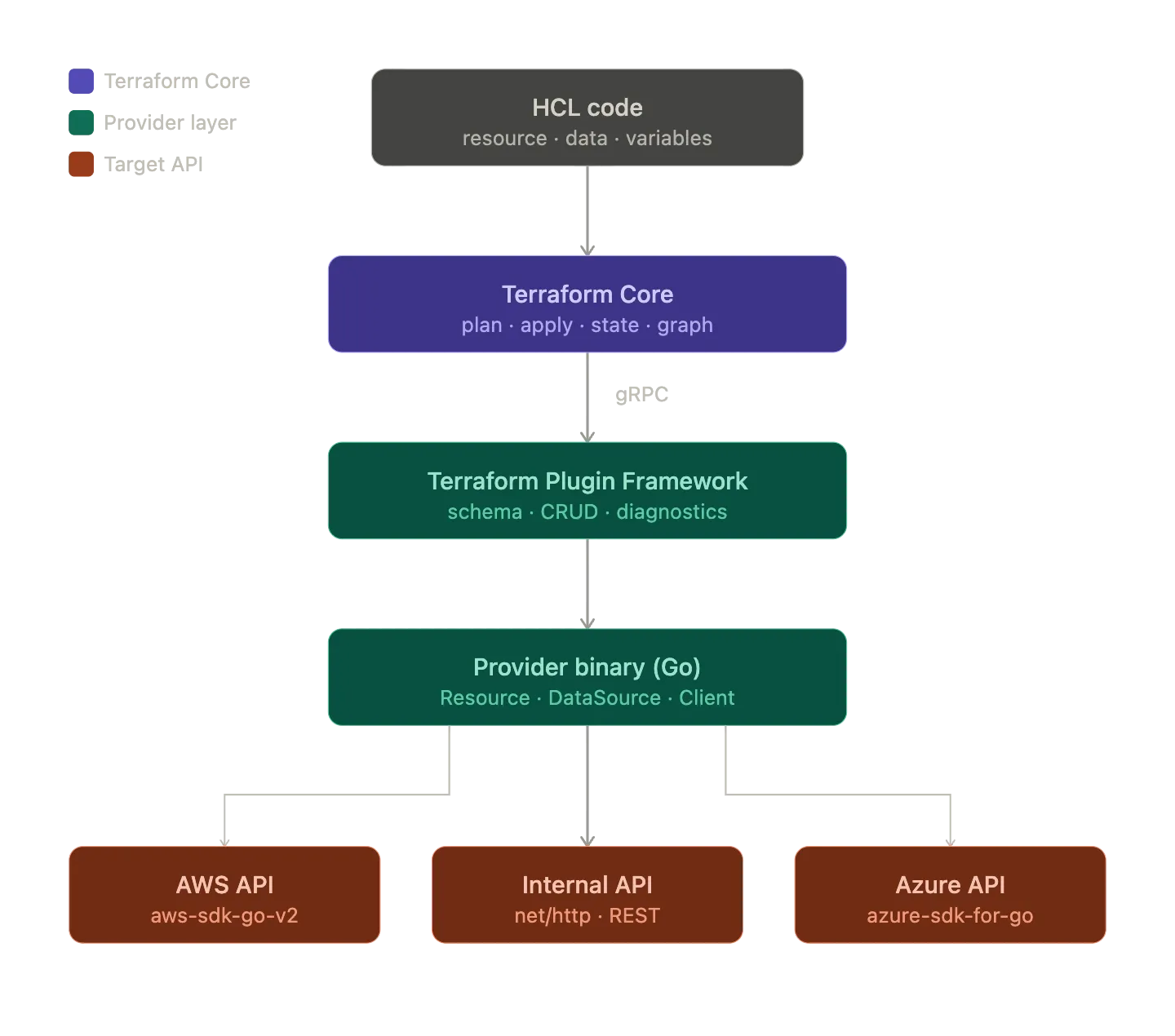
That separation is what makes Terraform extensible. Terraform Core handles planning and state management. The provider handles the business logic for a specific API.
Why build a custom provider
The common trigger is straightforward: you need Terraform to manage something it does not understand yet.
Internal platform APIs
Many platform teams already have internal systems for provisioning databases, namespaces, certificates, or app environments. If those systems only exist behind dashboards or scripts, they sit outside the rest of your infrastructure workflow.
A provider turns those platform capabilities into first-class Terraform resources:
resource "mycompany_database" "orders" {
  name   = "orders-db"
  tier   = "standard"
  team   = "backend"
  region = "eu-west-1"
}
That gives product teams a familiar interface and lets you keep the implementation details behind your platform boundary.
SaaS gaps and custom abstractions
Sometimes a provider exists, but it does not match how your team uses the service. You may need opinionated defaults, extra validation, or an internal wrapper API in front of a third-party platform.
A custom provider lets you encode that logic once instead of rebuilding it in every repository or pipeline.
Moving from scripts to managed state
Scripts are fine for one-off automation. They break down when you need state, drift detection, imports, and predictable lifecycle behavior.
If you are managing resources with Bash, Python, or Ansible today, a provider gives Terraform enough context to compare what exists with what should exist and act on the difference.
Platform abstractions
This is where custom providers become especially interesting. Instead of exposing raw cloud primitives, you can expose higher-level platform concepts such as an application environment, a tenant, or a managed service bundle.
That does not replace Terraform modules. It gives modules something new to build with.
Build with the Terraform Plugin Framework
The older Terraform Plugin SDK v2 still exists, but HashiCorp recommends the Terraform Plugin Framework for new providers. The framework gives you stronger typing, better diagnostics, and a cleaner model for schemas, validators, and plan modifiers.
| Aspect | Plugin SDK v2 | Plugin Framework |
|---|---|---|
| Go types | interface{} and maps | typed values such as types.String |
| Schema | schema.Schema maps | typed attributes and models |
| Diagnostics | basic error handling | structured diag.Diagnostics |
| Extensibility | limited | validators and plan modifiers |
| Maintenance | maintenance mode | actively developed |
If you are starting a provider today, the framework is the better default.
A minimal provider layout
terraform-provider-myapi/
├── internal/
│   └── provider/
│       ├── provider.go
│       ├── resource_server.go
│       └── datasource_team.go
├── main.go
├── go.mod
└── GNUmakefile
The entry point
The provider binary is small. Its job is to register the provider and let the framework serve it to Terraform:
package main

import (
    "context"
    "flag"
    "log"

    "github.com/hashicorp/terraform-plugin-framework/providerserver"
    "github.com/myorg/terraform-provider-myapi/internal/provider"
)

func main() {
    var debug bool
    flag.BoolVar(&debug, "debug", false, "set to true to run the provider with support for debuggers")
    flag.Parse()

    opts := providerserver.ServeOpts{
        Address: "registry.terraform.io/myorg/myapi",
        Debug:   debug,
    }

    err := providerserver.Serve(context.Background(), provider.New(), opts)
    if err != nil {
        log.Fatal(err.Error())
    }
}
The framework takes care of the protocol-level details. Most of your work lives in the provider, resource, and data source implementations.
Provider configuration and client wiring
A provider usually does two things: accept configuration from HCL and build the client that resources and data sources will share.
type MyAPIProviderModel struct {
    Endpoint types.String `tfsdk:"endpoint"`
    Token    types.String `tfsdk:"token"`
}

func (p *MyAPIProvider) Configure(ctx context.Context, req provider.ConfigureRequest, resp *provider.ConfigureResponse) {
    var config MyAPIProviderModel
    diags := req.Config.Get(ctx, &config)
    resp.Diagnostics.Append(diags...)
    if resp.Diagnostics.HasError() {
        return
    }

    client := &http.Client{}
    apiClient := NewMyAPIClient(config.Endpoint.ValueString(), config.Token.ValueString(), client)

    resp.ResourceData = apiClient
    resp.DataSourceData = apiClient
}
resp.ResourceData and resp.DataSourceData are the handoff points. They let every resource and data source reuse the same configured client.
Where resource logic lives
Resources map directly to what users write in HCL. A common pattern is to define a model struct with one field per schema attribute and then implement the CRUD lifecycle around it.
type ServerResourceModel struct {
    ID     types.String `tfsdk:"id"`
    Name   types.String `tfsdk:"name"`
    Region types.String `tfsdk:"region"`
    Tier   types.String `tfsdk:"tier"`
}
A Create method usually looks like this:
func (r *ServerResource) Create(ctx context.Context, req resource.CreateRequest, resp *resource.CreateResponse) {
    var plan ServerResourceModel
    diags := req.Plan.Get(ctx, &plan)
    resp.Diagnostics.Append(diags...)
    if resp.Diagnostics.HasError() {
        return
    }

    server, err := r.client.CreateServer(ctx, CreateServerRequest{
        Name:   plan.Name.ValueString(),
        Region: plan.Region.ValueString(),
        Tier:   plan.Tier.ValueString(),
    })
    if err != nil {
        resp.Diagnostics.AddError("Error creating server", err.Error())
        return
    }

    plan.ID = types.StringValue(server.ID)
    diags = resp.State.Set(ctx, plan)
    resp.Diagnostics.Append(diags...)
}
The flow stays simple:
- Read the planned state.
- Call the target API.
- Write the resulting state back to Terraform.
Read, Update, and Delete follow the same shape. If the resource no longer exists in the API, Read should usually call resp.State.RemoveResource(ctx) so Terraform can plan the next step from a clean state.
Talking to the target API
The framework does not care how you talk to the system on the other side. A plain Go HTTP client is often enough:
type MyAPIClient struct {
    endpoint   string
    token      string
    httpClient *http.Client
}

func (c *MyAPIClient) CreateServer(ctx context.Context, payload CreateServerRequest) (*Server, error) {
    body, _ := json.Marshal(payload)
    req, err := http.NewRequestWithContext(ctx, http.MethodPost, c.endpoint+"/servers", bytes.NewBuffer(body))
    if err != nil {
        return nil, err
    }

    req.Header.Set("Authorization", "Bearer "+c.token)
    req.Header.Set("Content-Type", "application/json")

    resp, err := c.httpClient.Do(req)
    if err != nil {
        return nil, err
    }

    // Handle response and decode body.
}
If the target system already has a Go SDK, use it. The provider logic stays the same whether the client is raw HTTP, the AWS SDK, the Azure SDK, or your own internal library.
When a provider is better than scripts or modules
The most common question is whether you really need a provider at all. Often, that means choosing between a script, a provider, and a module.
Provider vs scripts
A script executes actions. A provider manages state.
| Capability | Script or pipeline | Provider |
|---|---|---|
| State management | manual or absent | built in |
| Idempotency | depends on implementation | part of the model |
| Plan before apply | no | yes |
| Drift detection | no | yes |
| Import existing resources | no | yes |
| Cross-resource references | manual | native HCL references |
If you only need a one-time task, a script is simpler. If you need ongoing lifecycle management, a provider is usually the better tool.
Provider vs modules
A module organizes resources that Terraform already understands. A provider introduces new resource types.
If the system you want to manage has no resource type yet, a module is not enough. In practice, the two tools work together: the provider exposes primitives, and modules compose those primitives into higher-level interfaces.
Provider primitives           Module abstraction
-------------------           ------------------
myapi_server                  module "app_environment"
myapi_database        ->        myapi_server + myapi_database
myapi_network                  + myapi_network + aws_route53_record
What this unlocks for platform teams
The interesting part of a custom provider is not that it lets you call another API from Terraform. Plenty of tools can do that.
The real value is that it gives your platform a stable interface. Instead of teaching every team the details of cloud services, internal APIs, and deployment workflows, you can give them a resource model that matches how the platform actually works.
That changes the conversation from “how do we script this?” to “what is the right abstraction to expose?” Once you get that right, Terraform becomes part of your platform interface instead of just another tool around it.
Final takeaway
Building a Terraform provider is more approachable than it used to be. With the Terraform Plugin Framework, the core implementation is mostly straightforward: define a schema, translate CRUD operations into API calls, and keep Terraform state accurate.
For a production provider, you will still want retries, acceptance tests with terraform-plugin-testing, generated docs with tfplugindocs, and a distribution strategy for your team. But those are hardening steps, not reasons to avoid starting.
If your team already has infrastructure workflows that live outside Terraform because “there is no provider for that,” writing one is often the cleanest way to bring that system back into the same operating model as everything else.